49

Hole io

Hole.io 2

Paper io 2

Holey.io Battle Royale

Baseball Bros IO

Slither IO

Eaglercraft

Veck IO

1v1.lol

Hole Fire
Rob Brainrot 2
Slide Down

Bat Smash

Skribbl io

Agar IO
Billiards Master is an authentic billiards game that offers you a completely new experience. Online matches take place frequently, and even if you want to play a quick game, it won't disappoint you.
What I really like is the variety. You’ve got classic modes like 8-ball and 9-ball, plus UK 8-ball, Snooker, and some creative ones like Time Trial and Matrix Mode. There’s even a Practice Mode for when I just want to chill and take shots without pressure. If you’re into pool like I am, there’s definitely something here for you. Honestly, it kind of makes you want to keep playing until you feel like a real pool master.
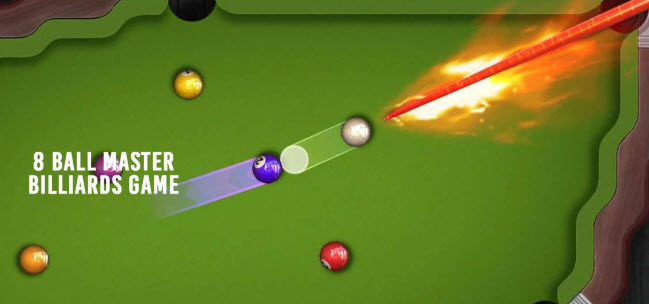
One thing I appreciate is how much control you have over the experience. You can customize the pool table with different colors and cloth patterns, which sounds small but actually makes it feel more personal.
Time Trial mode is where things get intense. You’ve got four minutes, and I always find myself rushing to pocket balls as fast as possible. The more balls you sink in a row, the higher your multiplier goes, which really pushes you to stay focused. It’s fast-paced and kind of addictive.
Matrix Mode, on the other hand, takes a bit more thinking. I remember messing up at first because I didn’t pay attention to the ball order. If you pocket a higher-numbered ball, your score jumps—but if it’s lower, your score drops. It’s one of those modes where you really have to slow down and plan your shots.
And if you’ve ever wondered what it’s like to play on a real pool table, this game gets surprisingly close. The physics, the angles, the way the balls move—it all feels pretty natural. I’ve actually noticed my aim improving just from playing. When I just want to relax, I switch to Practice Mode and play freely without worrying about rules or scores.
The controls are simple and easy to get used to, whether you’re playing solo or with someone else:
Click and drag the mouse to adjust the direction and add a curve to the ball.
Use the left mouse button to control how strong your shot is.
Click the ball icon to start your turn.